
RAR
Screenshots
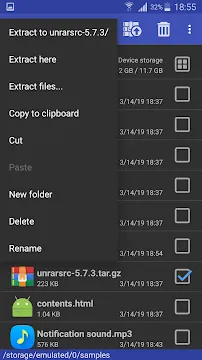
RAR is a legendary compression tool that has successfully moved from the desktop to the mobile world. It provides users with a complete file management solution. You can create, extract, and repair archive files directly on your smartphone. The app handles various formats beyond just its namesake. It works with ZIP, TAR, GZ, BZ2, XZ, 7z, ISO, and ARJ files.
Most people recognize it as the mobile version of WinRAR. It offers a clean interface that prioritizes function over flash. This tool is essential for anyone who handles large datasets or needs to organize their storage. It allows you to shrink file sizes to save space. You can also protect your sensitive data with strong encryption. This guide explores why this application remains a top choice for file management.
Mastering the Core Features of RAR
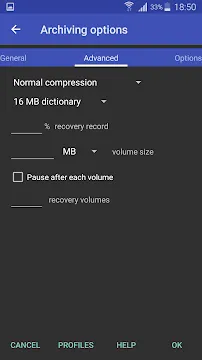
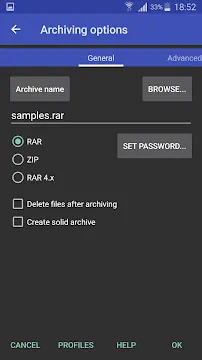
The primary goal of RAR is to simplify how you handle archives. It allows you to create both RAR and ZIP files with ease. You can choose different compression levels depending on your needs. For example, choose “Store” for speed or “Best” to save maximum space.
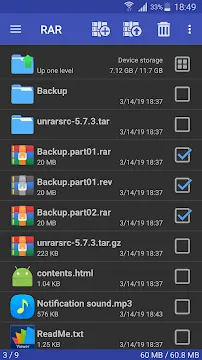
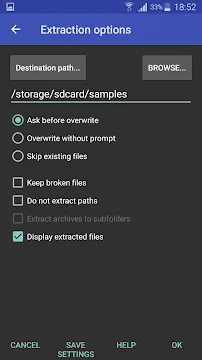
The app also features a robust extraction engine. It can unpack almost any compressed format you encounter online. This includes multipart archives where a single file is split into several pieces. The app automatically detects these parts and joins them during extraction.
Additionally, the interface includes a basic file explorer. You can browse your internal storage and SD card folders. This makes it easy to find the specific documents you want to pack. You can delete, copy, and move files without leaving the application.
Enhancing Security with RAR Encryption
Security is a major concern for mobile users today. RAR provides an excellent way to protect your private documents. You can set a password when creating a new archive. The app uses AES-128 or AES-256 encryption standards to keep data safe.
This feature is vital when you share files via email or cloud storage. Even if someone intercepts the file, they cannot see the contents without the key. You can also encrypt file names. This prevents others from even knowing what types of documents are inside the folder.
Moreover, the app allows you to create recovery volumes. If a file becomes corrupted during a transfer, these volumes help you fix it. This adds an extra layer of reliability for important backups. You can trust that your data will remain intact and private.
Improving Performance through RAR Optimization
Many users struggle with limited storage space on their devices. RAR helps solve this by shrinking large folders into smaller packages. High compression ratios are particularly effective for text documents and certain image formats.
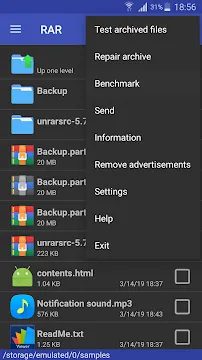
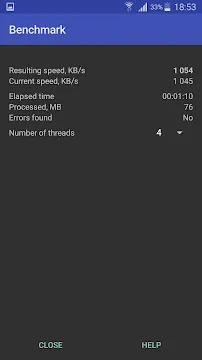
The app also includes a benchmark tool. This feature tests how fast your device can compress and decompress data. It gives you an idea of your phone’s processing power. If you have a multi-core processor, the app uses all of them to speed up the work.
Furthermore, you can manage the “Dictionary Size” in the settings. Increasing this size often results in better compression for large files. However, it requires more memory. The app gives you the flexibility to balance speed and efficiency based on your hardware specs.
Navigating the Simple Interface of RAR
The design of the app focuses on utility and speed. When you open the app, you see a list of your folders. You can select multiple items by tapping the checkboxes on the right. Once you select your files, the top toolbar provides icons for “Add” and “Extract.”
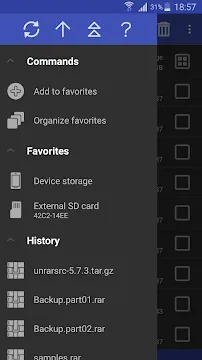
The navigation drawer on the left offers quick access to your favorite folders. You can bookmark specific paths to save time later. This is helpful if you frequently download files to a specific directory.
The app also supports a dark mode. This reduces eye strain when you work in low-light environments. The icons are clear and easy to understand, even for beginners. You do not need technical expertise to start zipping and unzipping files immediately.
Why RAR is Better Than Standard File Managers
Built-in file managers often lack advanced archiving tools. They might only handle basic ZIP files. RAR fills this gap by supporting professional formats like 7z and ISO. It handles complex tasks that stock apps simply cannot perform.
For instance, the repair command is a lifesaver. If you download a broken ZIP file, this tool can often recover the healthy parts. Most standard apps would just give you an error message.
The app also manages spanned archives perfectly. These are large files broken into smaller chunks to fit upload limits. RAR recognizes the sequence and extracts them as one continuous file. This level of sophistication makes it a superior choice for heavy users.
Conclusion
RAR remains an indispensable tool for mobile productivity. It combines power, security, and ease of use in a small package. You can compress files to save space or encrypt them for better privacy. The ability to repair damaged archives sets it apart from every competitor.
Whether you are a student or a professional, handling files is part of daily life. This application ensures that you can manage those files without needing a desktop computer. It is fast, reliable, and completely functional. If you want total control over your mobile storage, this tool is the right answer.